Home › Kerala PSC
Official Portal Guide
Kerala PSC Thulasi Login 2026 (Official) – Hall Ticket, Results, My Profile
Last Updated: 16 April 2026
Login to the official Kerala PSC Thulasi portal to manage your profile, apply for government jobs, download hall tickets, and check examination results.
കേരള PSC തുളസി ഔദ്യോഗിക പോർട്ടലിൽ ലോഗിൻ ചെയ്ത് പ്രൊഫൈൽ മാനേജ് ചെയ്യുക, സർക്കാർ ജോലികൾക്ക് അപേക്ഷിക്കുക, ഹാൾ ടിക്കറ്റ് ഡൗൺലോഡ് ചെയ്യുക.
കേരള പി എസ് സി തുളസി ലോഗിൻ, പി എസ് സി റിസൾട്ട്, ഹാൾ ടിക്കറ്റ്, യൂസർ ഐഡി, പാസ്വേഡ് reset എന്നിവയ്ക്കുള്ള പൂർണ്ണ ഗൈഡ്.
🔒 Official portals open in a new tab. Practice questions are free on ExamFlare.
Quick Actions
How to Login to Kerala PSC Thulasi
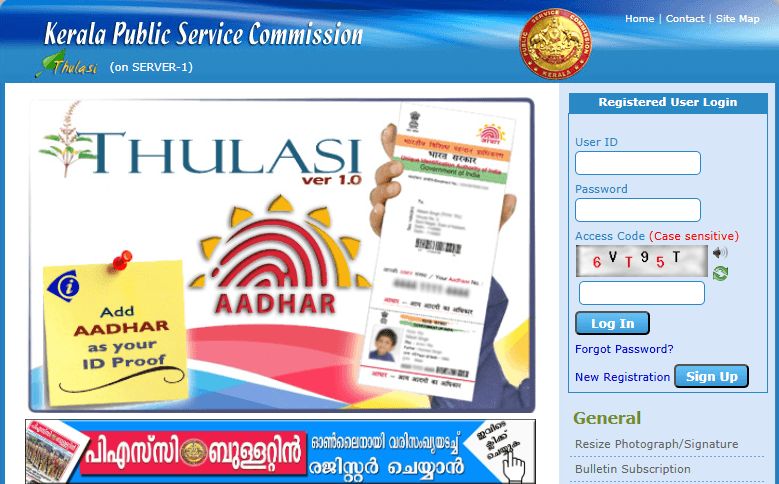
Follow these steps to login to the Kerala PSC Thulasi portal and access your account:
1
Visit the Official Portal
Open your browser and go to thulasi.psc.kerala.gov.in/thulasi/. Always use the official URL to ensure security.
2
Enter Your Credentials
Type your User ID and Password in the respective fields. Remember, both fields are case-sensitive.
3
Enter the Captcha Code
Type the captcha code shown on the screen. If you can't read it clearly, click the refresh icon to get a new captcha.
4
Click "Login"
Click the Login button. You'll be redirected to your My Profile dashboard where you can manage applications, download hall tickets, and more.
Tip: If you face login issues, clear your browser cache, try a different browser, or check if the PSC server is under maintenance.
Kerala PSC One Time Registration (New Registration)
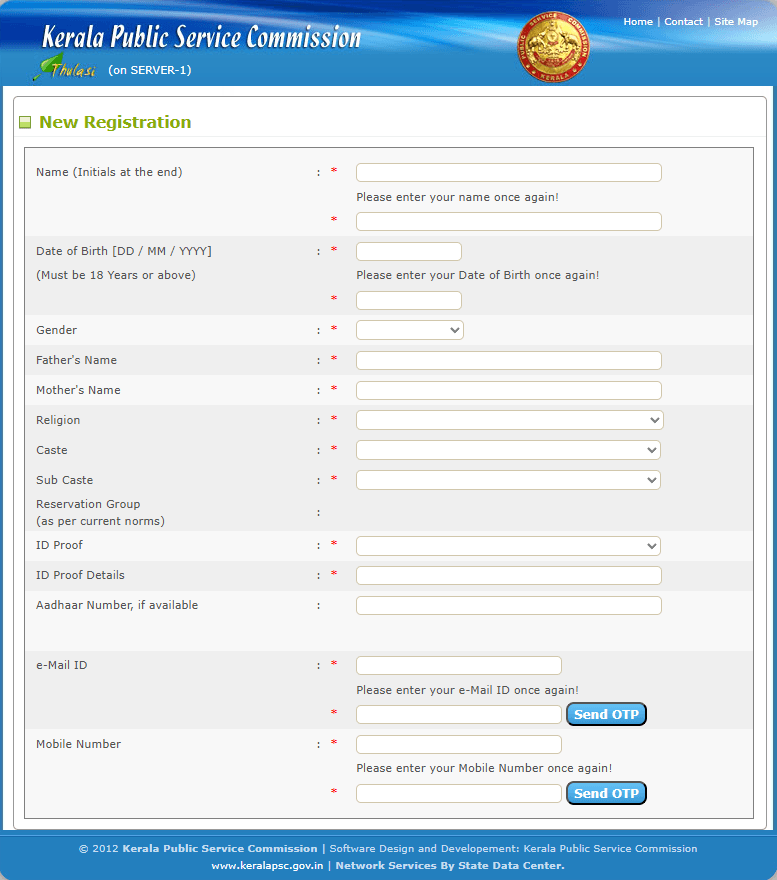
Kerala PSC ആദ്യമായി ഉപയോഗിക്കുന്ന ഉദ്യോഗാർത്ഥികൾക്ക് One Time Registration (OTR) ചെയ്യേണ്ടതുണ്ട്. ഒരിക്കൽ രജിസ്ട്രേഷൻ ചെയ്താൽ, എല്ലാ PSC പരീക്ഷകൾക്കും ഒരേ അക്കൗണ്ട് ഉപയോഗിച്ച് അപേക്ഷിക്കാം.
1
Click "New Registration"
Visit the Thulasi portal and click on the "One Time Registration" or "New Registration" button on the homepage.
2
Fill Personal Details
Enter your full name, date of birth, address, phone number, email, and other personal information accurately.
3
Add Educational Qualifications
Fill in all your educational qualifications including SSLC, Plus Two, Degree, and any professional qualifications.
4
Upload Photo & Signature
Upload a recent passport-size photograph (JPG, 10-30KB) and your scanned signature (JPG, 10-30KB) as per the guidelines.
5
Create User ID & Password
Choose a unique User ID and a strong password. Note these down carefully — you'll need them for every future login.
6
Verify & Submit
Review all details carefully and submit. Your registration is now complete! You can start applying for PSC notifications.
How to Reset Kerala PSC Thulasi Password
Fastest Method (via SMS)
Send an SMS from your registered mobile number to 166 / 51969 / 9223166166 in the exact format:
Example: To reset the password of user aniltvm born on 16/4/1983, send
Note: Don't forget to change your password immediately on your first login after reset.
Send an SMS from your registered mobile number to 166 / 51969 / 9223166166 in the exact format:
KL USR RST USERID DATE_OF_BIRTHExample: To reset the password of user aniltvm born on 16/4/1983, send
KL USR RST aniltvm 16041983.Note: Don't forget to change your password immediately on your first login after reset.
Alternative Method (Online Website):
1
Click "Forgot Password?"
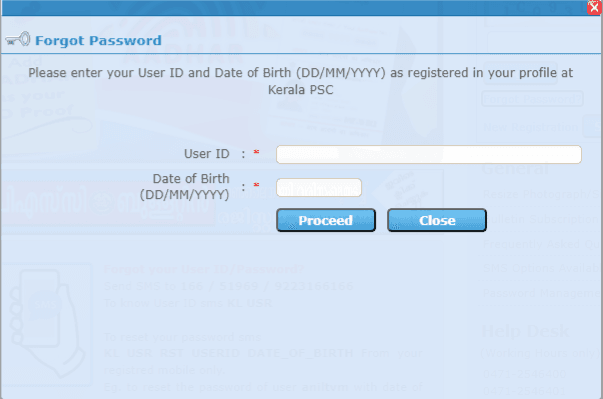
On the Thulasi login page, click the "Forgot Password?" link below the login form.
2
Enter Your Details
Provide your User ID and Date of Birth (DD/MM/YYYY) exactly as registered in your profile.
3
Set New Password
After verification, create a new strong password and confirm it. Click submit to update.
How to Recover Kerala PSC User ID
Forgot your User ID? PSC Thulasi User ID തിരികെ എടുക്കാൻ താഴെ പറയുന്നവ ചെയ്യുക:
1
Send SMS to Official Numbers
Send an SMS from your registered mobile number to 166 / 51969 / 9223166166 in the exact format: KL USR.
2
Contact PSC Helpdesk
If the SMS method fails, you can contact the PSC helpdesk at 0471-2546400 or 0471-2546401 with your basic details.
How to Download Kerala PSC Thulasi Hall Ticket
പി എസ് സി ഹാൾ ടിക്കറ്റ് ഡൗൺലോഡ് ചെയ്യാൻ ഈ ലളിതമായ സ്റ്റെപ്പുകൾ പിന്തുടരുക:
1
Login to My Profile
Login to the official Thulasi portal using your User ID and Password.
2
Click Admission Ticket
Find the "Admission Ticket" or "Hall Ticket" menu option prominently displayed on your dashboard.
3
Select Exam & Download
Select your upcoming exam and click download. Take a neat printout of the PDF.
How to Check Kerala PSC Results
നിങ്ങളുടെ റാങ്ക് ലിസ്റ്റ് അല്ലെങ്കിൽ ഷോർട്ട് ലിസ്റ്റ് (പി എസ് സി റിസൾട്ട് എങ്ങനെ നോക്കാം) ഓൺലൈനിൽ പരിശോധിക്കാൻ: You can also check our full Kerala PSC Result Guide here.
1
Visit Official PSC Result Page
You can check the main website (keralapsc.gov.in) under the "Results" tab for general rank lists and short lists.
2
Thulasi Internal Results
Login to your Thulasi Profile and check the relevant notifications panel to see if your register number was selected.
Frequently Asked Questions (FAQ)
What is Kerala PSC Thulasi?
Kerala PSC Thulasi is the official online portal of the Kerala Public Service Commission (KPSC). It allows candidates to register, apply for government jobs, download hall tickets, check results, and manage their profiles for all PSC examinations in Kerala.
What is the official website of Kerala PSC Thulasi?
The official website of Kerala PSC Thulasi is thulasi.psc.kerala.gov.in/thulasi/. Always use this official URL to avoid phishing or fraudulent websites.
How do I login to Kerala PSC Thulasi?
Visit the official Thulasi portal, enter your registered User ID, Password, and the Captcha code displayed on screen. Then click the "Login" button. Your credentials are case-sensitive.
How to register on Kerala PSC Thulasi for the first time?
Go to the Thulasi portal and click "New Registration" or "One Time Registration". Fill in your personal details (name, date of birth, address, qualifications), create a User ID and password, upload your photo and signature in the required format, and submit the form.
I forgot my Kerala PSC Thulasi password. How to reset it?
On the Thulasi login page, click the "Forgot Password?" link. Enter your User ID, date of birth, and your registered Unique ID details. The system will allow you to set a new password.
How to download Kerala PSC Hall Ticket from Thulasi?
Login to your Thulasi account, go to the "Admission Ticket" section from the dashboard menu. Select the specific examination and click download. Print the hall ticket and carry it to the exam center.
How to check Kerala PSC results?
You can check results by visiting the main Kerala PSC website (keralapsc.gov.in) and navigating to the "Results" section. For individual profile results, login to your Thulasi account and check the relevant section.
What photo and signature size is required for Thulasi registration?
The photograph should be a recent passport-size photo in JPG/JPEG format (file size usually between 10KB to 30KB). The signature should also be in JPG/JPEG format with similar size constraints. Check the registration page for current exact specifications.
Can I edit my profile after registration on Thulasi?
Yes, you can edit certain details in your profile after logging in. Navigate to "My Profile" to update your photograph, signature, educational qualifications, and other details. However, some core fields like name and date of birth may require official request to change.
Is Kerala PSC Thulasi available on mobile?
Yes, you can access the Kerala PSC Thulasi portal through your mobile browser. Visit thulasi.psc.kerala.gov.in/thulasi/ on any smartphone browser to login and manage your account.
Prepare for Kerala PSC Exams on ExamFlare
Thulasi-ൽ apply ചെയ്ത ശേഷം, ExamFlare-ൽ previous year questions പ്രാക്ടീസ് ചെയ്ത് നിങ്ങളുടെ പരീക്ഷാ തയ്യാറെടുപ്പ് ശക്തമാക്കുക. 1000+ ചോദ്യങ്ങൾ English & Malayalam-ൽ വിശദീകരണങ്ങൾ സഹിതം ലഭ്യമാണ്.
Kerala PSC Questions and Answers
Practice 1000+ PSC questions and answers with detailed explanations in English & Malayalam
Latest Kerala PSC Notifications
View latest vacancies, category numbers, last date & how to apply online
Hall Ticket Download Guide
Step-by-step guide to download admission ticket from Thulasi portal
Kerala PSC Result & Rank List
Check rank lists, short lists, and download official answer keys
Ready to Login?
Access the official Kerala PSC Thulasi portal now
Go to PSC Thulasi Portal